
Yes – under certain conditions. Today’s AI can write postprocessor code for Autodesk Fusion, explain an existing script or propose a change to the output. That is only part of the job, though. Generating code that runs is not the same as delivering a verified postprocessor that the machine operator can trust.
The difference lies in the input information and in verification. This article explains where AI genuinely speeds up development, what it cannot infer from the available material and why knowledge of the specific kinematics is decisive on multi-axis machines.
Quick summary
- Yes, but: AI can write working postprocessor code. Production reliability requires a precise specification and verification on the machine.
- Three layers: CAM calculates the toolpath, the postprocessor translates and transforms it for the machine, and the control executes it.
- An NC program is not enough: it shows syntax, not axis limits, the meaning of macros or behaviour in untested situations.
- Multi-axis machines: rotary-axis limits, solution selection and safe transitions require an exact description of the machine.
- The developer's role: less routine coding, more specification, testing and responsibility for the result.
In this article
What a postprocessor actually does
A postprocessor is often described as a “G-code translator”. That is only partly true. Three layers work between the model and the machine’s motion, and each has its own responsibility:
- The CAM engine (CAM, computer-aided manufacturing, here Autodesk Fusion) calculates toolpaths in part coordinates: tool positions, the tool axis direction in multi-axis operations, linking moves and heights within operations.
- The postprocessor receives these toolpaths as a sequence of events – start of an operation, rapid move, linear and circular move, drilling cycle, end of program. It converts them into the syntax and format of the specific control. On multi-axis machines it also converts the tool direction into rotary-axis angles and inserts transitions between operations.
- The CNC control executes the motion: it interpolates, manages acceleration, evaluates cycles and macros and monitors software axis limits. If the machine uses TCP (Tool Center Point, control of the tool tip position), the control also takes over part of the kinematic calculation.
In Fusion, a postprocessor is a JavaScript file with the .cps extension. Autodesk publishes an API reference for it. We explain the basics in more detail in What is a postprocessor in CAM software and Autodesk Fusion postprocessor basics.

This division is essential for AI. A language model sees the postprocessor code, but not the machine it is written for.
Are an input and an output file enough for AI?
A common idea: give the AI a Fusion project and an NC program that works on the machine, and let it write a postprocessor that produces the same output. For a simple machine and a limited set of operations, this can lead to a usable starting point.
A sample program, however, shows what the machine received, not why. It does not reveal, for example:
- axis limits and what should happen when a toolpath exceeds them,
- the meaning of machine-specific M functions and macros and their side effects,
- how situations that did not occur in the sample should behave – a different cycle, cutter radius compensation, helical motion, another plane,
- the control parameter settings the output depends on.
A model that lacks information usually fills the gap with something plausible. The code then looks right and even works for the sample operations; the difference only shows up in a situation nobody tested. One NC program is an example, not a specification. A good brief therefore includes the machine model and configuration, the control version, the programming manual, a list of supported operations and several proven programs covering different cases.
3-axis and multi-axis machining: a different task
In 3-axis milling, the postprocessor converts X, Y and Z coordinates almost directly. Most of the work is in the format: tool changes, cycles, block numbering, program header and end. This is where AI saves the most time, because much of it is regular syntax.
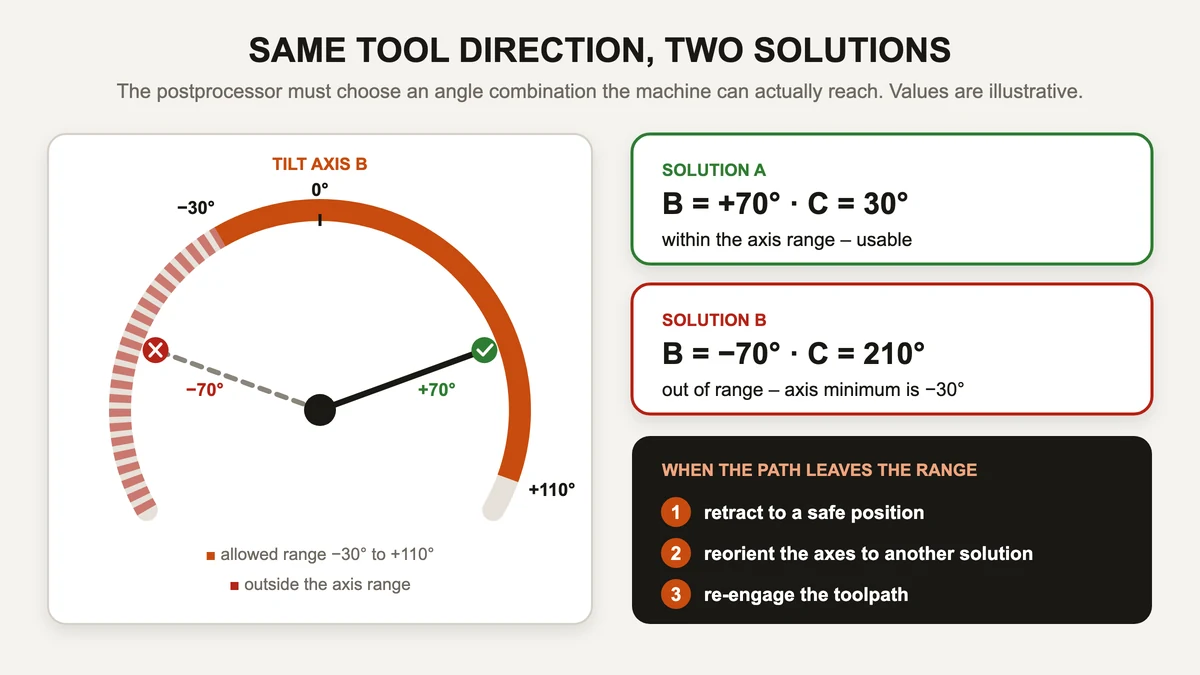
On multi-axis machines, geometry is added. Fusion describes a machine configuration through its rotary axes, their ranges and a preferred solution (MachineConfiguration). The same tool direction can often be reached with two angle combinations, and the postprocessor must choose the one that fits within the limits and does not cause unnecessary rewinding.
Another decision is who performs the kinematic calculation. With TCP active in the control, the postprocessor outputs the tool tip position and the control calculates the rest. Without TCP, the postprocessor must calculate the position itself and therefore needs the exact dimensions of the machine’s kinematics. We explain the differences in 3+2 vs simultaneous 5-axis machining.
Working code versus production reliability
Working code means that the postprocessor runs and produces a program the control accepts. Production reliability means that the program does what CAM intended, even in edge cases, and can be trusted without manually checking every file.
A typical example is the safe transition between operations. Moving from one tilted plane to another in a straight line is not necessarily safe: the tool may hit a clamp or the part. That is why a postprocessor usually first retracts to a safe position in machine coordinates and only then rotates the axes. Code without this step passes a syntax check and even a simulation of a single operation – and can still be dangerous.
Verification therefore happens in layers:
- Output review – comparison with proven programs and with the control’s programming manual.
- Simulation with a machine model – meaningful only if the machine model, fixtures and tools match reality.
- Controlled machine test – single block, reduced rapid override, an air cut above the material.
- First part and monitoring in production – including operations that did not occur in the test.
These steps apply regardless of whether the code was written by a person or by AI. AI can speed them up, but it does not replace them.
Where AI really helps in development
In a well-managed process, AI is a powerful tool, especially for:
- routine code – output formatting, new Post Properties, headers and comments,
- understanding an existing postprocessor – explaining someone else’s or an older script and finding where a specific output line is created,
- comparing outputs – differences between two versions of an NC program and their possible causes,
- designing tests – a list of operations and edge cases that need to be generated and checked,
- documentation – describing postprocessor properties for CNC programmers and operators.
The remaining risk is that the model suggests a function that does not exist in the API or behaves differently in a given version. The output must therefore be checked against Autodesk’s documentation and the machine’s actual behaviour. We describe the wider use of AI in manufacturing and CAD/CAM on our AI automation page.

How the developer’s role is changing
AI is changing the economics of development. A postprocessor prototype or an output change can be produced faster and at lower cost, which opens the door to solutions that used not to pay off – for example, an adaptation for a single older machine.
The focus of the developer’s work is shifting from writing every line to what AI cannot provide on its own: obtaining and verifying exact machine information, turning it into an unambiguous specification, designing tests and taking responsibility for the result on the machine. Anyone who understands kinematics, controls and shop-floor practice will work more effectively with AI than without it. Those who only rewrite sample code will feel the competition from AI the most.
Conclusion
AI can significantly speed up CNC postprocessor development and change its cost. It does not, however, remove the need to know which machine the postprocessor is written for, what exactly it should do and how it will be verified. The quality of the specification, knowledge of the machine and careful verification decide whether the result is code that merely runs or a postprocessor that can be trusted in production.
If you are preparing a postprocessor for a specific machine, we can help with the specification, with developing or adapting a postprocessor for Autodesk Fusion and with verifying its output. You can find the machines we already have postprocessors for in our postprocessor list.
