A customer asks for a different logo in the header. Your production manager wants one more column in the tool table. A second machine needs the same document layout, but it uses a different post processor. Small setup sheet changes can quickly turn into another coding task inside the post.
Setup Sheet Studio separates job documentation from NC code generation. Instead of embedding presentation logic in the post processor, this new Autodesk Fusion add-in builds the report directly from Fusion CAM data and gives you a live, visual configuration workflow — no .cps editing required.
Quick summary
- What it is: a visual setup sheet generator for Autodesk Fusion.
- How it works: reads CAM data directly through the Fusion API — no post processor changes needed.
- Configuration: drag-and-drop report sections, custom tool/operation table columns, company branding (logo, colors, font, page format).
- Languages: generates reports in English, Czech, German, Spanish, or French.
- Installation and updates: choose the Windows
.exeor macOS.pkginstaller; installation and future updates are handled automatically. - Output: a self-contained HTML report you print or save as a PDF; report creation remains local and has no telemetry.
Why traditional Fusion setup sheets become difficult to maintain
Many shops customize their Autodesk Fusion setup sheets by adding HTML or text formatting directly to the .cps post processor. That works, but it couples two different responsibilities: generating reliable machine code and designing human-readable job documentation.
The problem shows up as soon as the document needs to change. Adding a table column, adjusting the header, changing the brand colors, or reusing the same layout on another machine can mean another code edit and another post-processing test — even a purely visual change may require running the post again just to check whether one row landed in the right place.
| Post-processor-based setup sheet | Setup Sheet Studio |
|---|---|
Presentation logic is stored inside the .cps file. | Report configuration is kept separate from NC code generation. |
| Layout changes usually require code editing. | Sections and table content are configured visually. |
| Previewing may require another post-processing run. | A live preview shows the report while it’s being configured. |
| A different machine or post may require duplicate changes. | The same report design can be reused independently of the selected post processor. |
A different approach: read the CAM data directly
Setup Sheet Studio doesn’t read report content from the post processor and doesn’t write anything back to it. It accesses setup, operation, tool, stock, and work coordinate system data through the Autodesk Fusion API and renders the documentation itself.
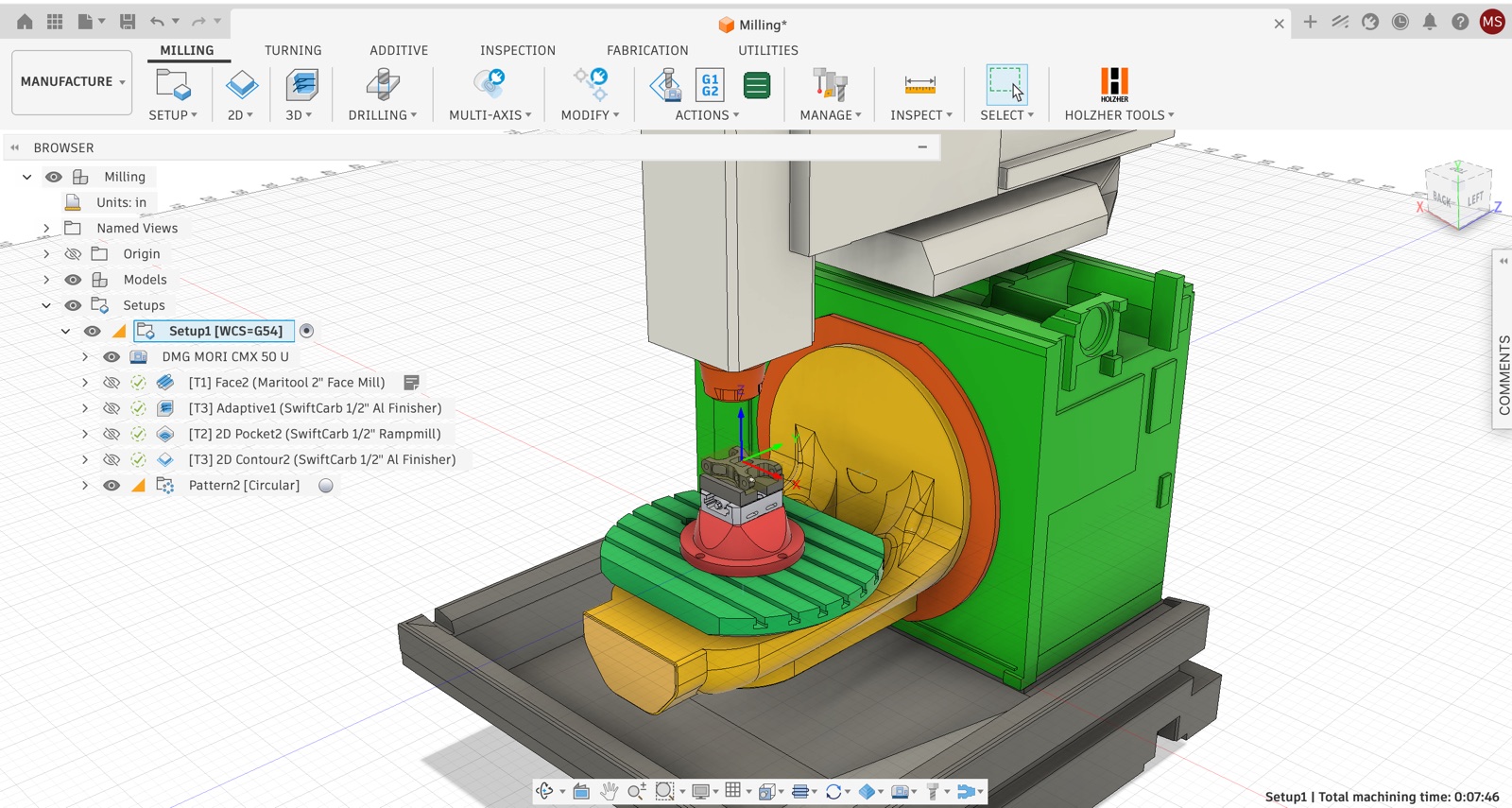
The practical result is a consistent setup sheet workflow across different jobs, machines, and post processors. CNC programmers can focus the post processor on machine output while keeping the document layout in a dedicated visual tool.
Want your Autodesk Fusion post processor and your setup sheets to work together without stepping on each other? Talk to us about your current workflow.
Get in touch →What Setup Sheet Studio can do
- Drag-and-drop report layout. Reorder sections such as the header, company information, setup details, stock and WCS data, tool table, operation table, notes, and footer — or hide sections you don’t need.
- Custom company branding. Add a company logo and business details, then configure the color theme, font, page format, and page orientation.
- Configurable tool and operation tables. Choose exactly which columns appear in each table, including operation notes and a cycle-time calibration factor based on actual shop experience.
- Five report languages. Generate setup sheets in English, Czech, German, Spanish, or French for international teams, branches, and customers.
- One-click report generation. Create a standalone, print-ready HTML document that opens directly in the browser and can be printed or saved as a PDF.
- Automatic installation and updates. Choose the Windows
.exeor macOS.pkgafter completing the form. The installer adds the add-in to Autodesk Fusion, and later versions are delivered automatically. - Offline report creation. The configurator and report generation run locally without telemetry. Internet access is only needed for the initial download and automatic updates.
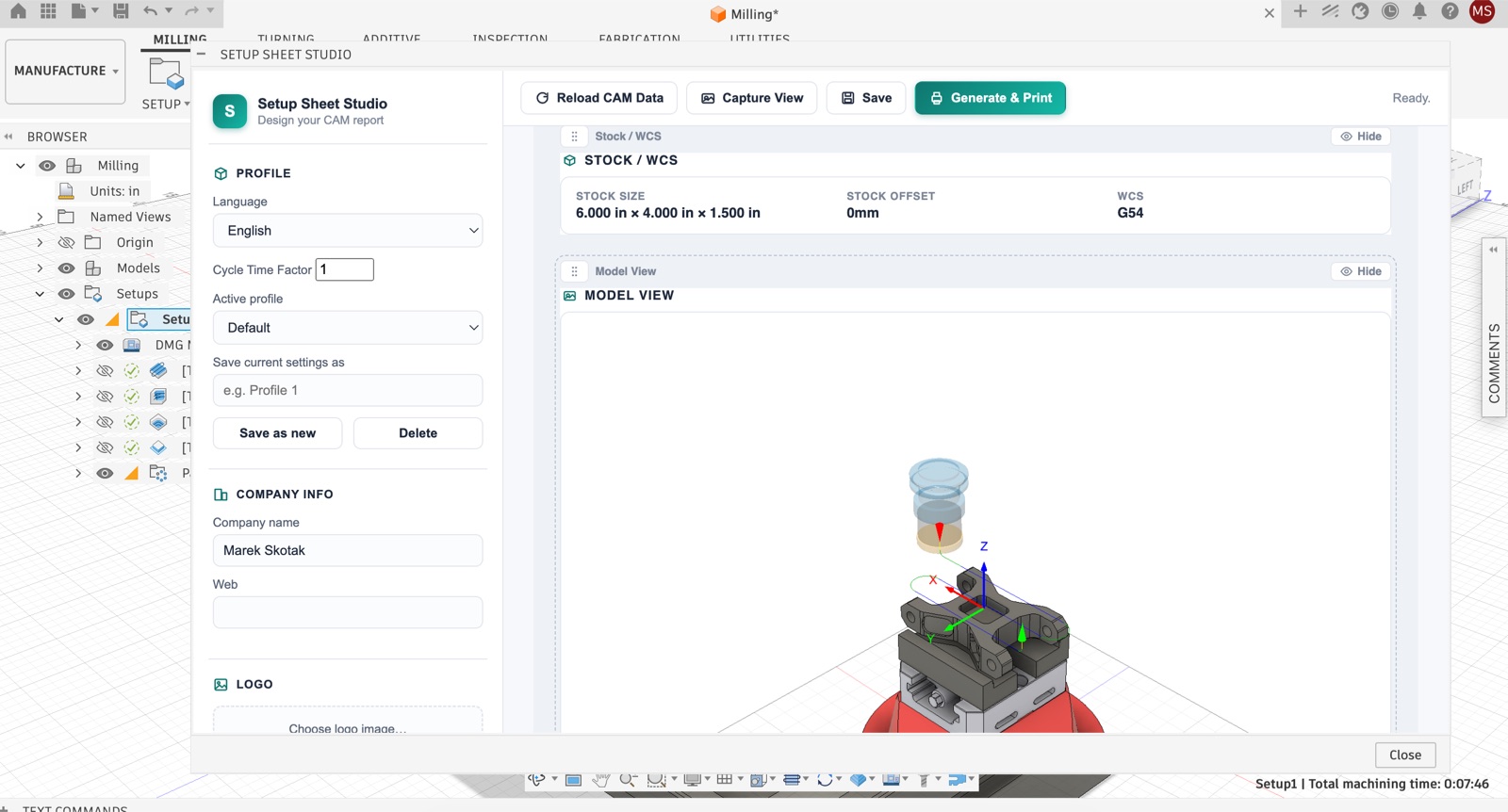
From Fusion CAM data to a printable PDF in four steps
- Open a Manufacture document. Use an Autodesk Fusion document that contains at least one CAM setup.
- Launch Setup Sheet Studio. Open the configurator from the Manufacture workspace panel or from Scripts and Add-Ins.
- Build the report. Arrange the sections, select the tool and operation columns, add your branding, and choose the report language.
- Generate and print. Open the completed report in the browser, then print it or save it as a PDF.
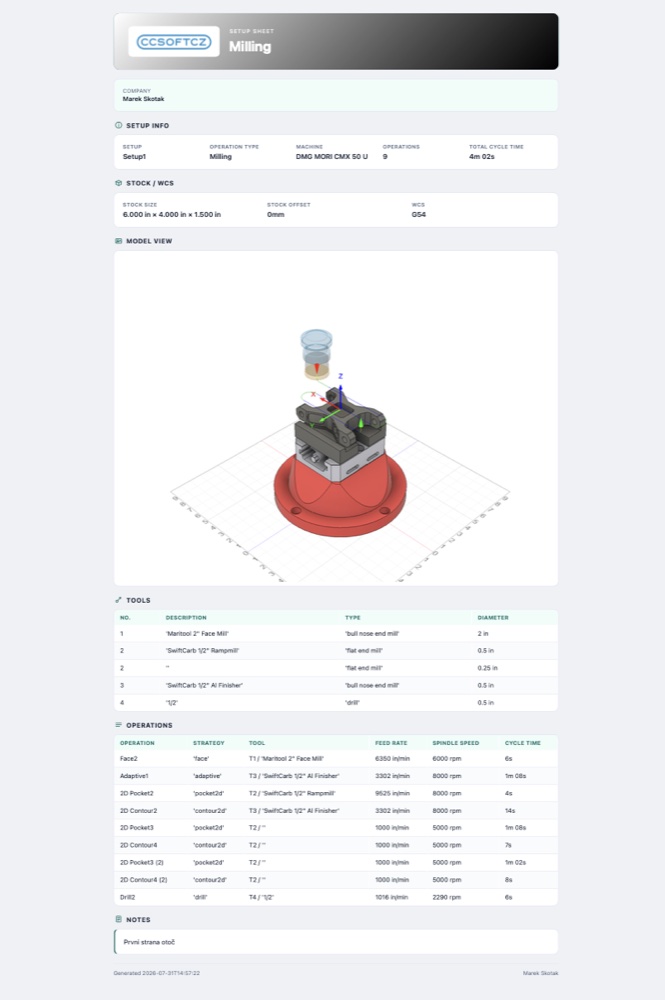
Who is Setup Sheet Studio for?
Setup Sheet Studio is built for CNC shops, manufacturing teams, and Fusion CAM users who want consistent, professional job documentation without maintaining report-design code inside every post processor.
It’s especially useful when a business needs the same visual standard across multiple machines, regularly changes the information shown to operators, works with international teams, or wants customer-facing documents that match its own brand.
A setup sheet may be the most visible piece of documentation connected to a CNC job. It should look like it came from your company — not from a generic software export.
If you’re also looking to automate G-code generation itself, see our full list of Autodesk Fusion postprocessors for machine-specific integrations. Preparing the CAM operations themselves is a separate bottleneck — see how Automatic Machining batch-creates them from a whole folder of models.
Product status: Setup Sheet Studio 1.2.0 is in early access and available free for Windows and macOS. After completing the form, select the Windows .exe or macOS .pkg; the emailed link always resolves to the latest matching installer from the official GitHub release repository. Open it to install the add-in automatically. Future updates are automatic. The current installers are unsigned, so Windows SmartScreen or macOS Gatekeeper may ask for confirmation. Autodesk App Store availability and licensing details for a future release have not yet been finalized.
Download Setup Sheet Studio for free
Tell us a bit about your shop, choose Windows or macOS, and we'll email you a link to the latest installer. Setup Sheet Studio is currently in early access — your feedback helps shape the release version.
