
You program 6,000 mm/min in Autodesk Fusion, post the NC file and start machining. Instead of holding a steady feed, the CNC repeatedly slows and accelerates. The cause is not automatically a bad CAM strategy or postprocessor: dense geometry, control limits, data delivery and axis dynamics interact.
Quick answer
- Short G1 segments are not inherently wrong. They become a limit when the control cannot plan them at the requested speed.
- Fusion smoothing can reduce point density and fit arcs where geometry and the target control allow it.
- Look-ahead and contour tolerance are CNC functions. They determine how consecutive blocks are traversed.
- A postprocessor cannot add control performance, a missing licence or mechanical stiffness.
Short G1 segments and block rate
CAM approximates complex 3D geometry with short linear moves:
G1 X100.000 Y20.000 Z-5.000 F6000
X100.150 Y20.020 Z-5.012
X100.300 Y20.045 Z-5.028
At 6,000 mm/min the tool travels at 100 mm/s. With 0.1 mm segments, maintaining that feed requires roughly 1,000 completed segments per second before direction changes and dynamics are considered. Block execution is also different from file-transfer speed: slow DNC can starve the buffer.
Look-ahead, Fusion smoothing and tolerance
Look-ahead analyses upcoming blocks so the control can plan speed changes. Its result depends on the interpolation cycle, planning algorithm, permitted contour deviation and axis limits—not just an advertised block count.
Fusion Tolerance defines the path approximation. Smoothing removes redundant points and can fit G2/G3 arcs; Steep and Shallow also offers Fit Arcs and, for suitable modern controls, Evenly Spaced Points. Unsupported spatial arcs may be linearised again during posting. Always verify the posted NC file, finished dimension and surface.
Controller-specific modes
| Control | Examples | Verify |
|---|---|---|
| Siemens SINUMERIK | G64; depending on options G641/G642/G645 or Advanced Surface | series, transformation, licence and tolerance |
| HEIDENHAIN | Cycle 32, HSC-MODE and possibly TA | TNC software, finishing/roughing and TCPM/M128 |
| FANUC | on supported systems, for example G05.1 Q1 | exact control, high-speed option and machine-builder logic |
| Haas | G187 | control generation and suitable P/E values |
| LinuxCNC | G64, G64 P and optionally Q | units, axis dynamics and safe rapid clearances |
These are not commands to copy between machines.
Real CCSOFTCZ HEIDENHAIN output
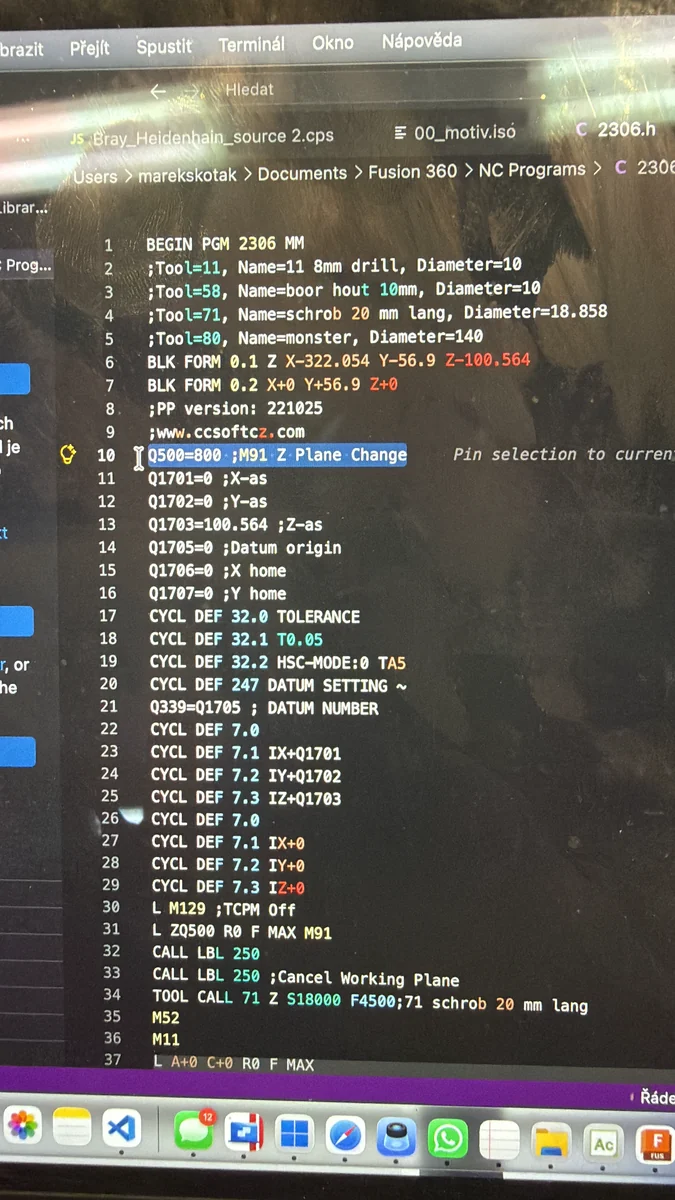
CYCL DEF 32.0 TOLERANCE
CYCL DEF 32.1 T0.05
CYCL DEF 32.2 HSC-MODE:0 TA5
T0.05 permits 0.05 mm contour deviation. HSC-MODE:0 selects the higher-contour-accuracy filter setting. TA5 permits five degrees of rotary-axis position deviation only with M128 or FUNCTION TCPM active; it is not an XYZ tolerance. The image proves the blocks are output, not that they improve cycle time or finish.
Five-axis dynamics and diagnosis
In simultaneous five-axis machining, a smooth XYZ path can still demand rapid rotary motion. Kinematics, tool length, head/table arrangement, TCP/RTCP/TCPM and singularities may force the whole move to slow. No smoothing algorithm can bypass head mass, backlash, resonance or drive limits.
Change one variable at a time on a safe representative path. Compare NC block count, actual time and feed, finish and dimensions. If a long straight move also stutters, inspect drives, mechanics, feedback and machine data rather than dense 3D code.
What a postprocessor can solve
A postprocessor can select a supported accuracy mode, distinguish roughing from finishing and output supported arc or spline formats. It cannot repair insufficient control performance, missing licensed functions, DNC starvation or mechanical faults.
A reliable diagnosis needs the exact control and software version, a representative NC sample, Fusion settings, transfer method and a short video.
Check the CAM and NC output →Smooth motion results from a suitable CAM representation, correct postprocessor output, a supported CNC mode and realistic machine dynamics—confirmed by measurement on the actual machine.
