
Machine assessment
You send the exact model, software version, axis configuration, aggregates and a proven sample program.
Autodesk Fusion toolpaths, translated for your SCM machine.
A machine-specific postprocessor for Autodesk Fusion (formerly Fusion 360) that turns CAM operations into structured XCS output for Maestro. Before quoting, Marek checks your exact machine, software version, axes and aggregates.
Compatibility and project scope are confirmed before you receive a quotation.
Already have your postprocessor? View the installation guide →

SCM machines with the same commercial name can differ in Maestro generation, Xilog environment, kinematics, tool database and aggregates. These are common project families, not a promise of universal plug-and-play support.
| SCM family | Typical configuration | Target workflow | Before delivery |
|---|---|---|---|
| Accord | 3- or 5-axis, routing and aggregates | Fusion → XCS → Maestro | Individual confirmation |
| Record | 3- or 5-axis machining centre | Fusion → XCS → Maestro | Individual confirmation |
| Pratix | Panel routing and drilling | Fusion → XCS → Maestro | Individual confirmation |
| Morbidelli M100 / N100 | Drilling, routing and panel operations | Fusion → XCS → Maestro | Individual confirmation |
| Author | Legacy and newer Xilog/Maestro setups | Workflow confirmed from samples | Individual confirmation |
| Tech Z5 | 5-axis head and machine kinematics | Machine definition + XCS output | Individual confirmation |
Compatibility is confirmed from the machine model, serial/configuration, Maestro or Xilog version, axis arrangement, installed aggregates and a proven machine program. New output must always be tested safely on the actual machine.
The deliverable is not a generic file with your logo added. The output is configured and checked against the information you provide.
You send the exact model, software version, axis configuration, aggregates and a proven sample program.
Fusion properties, cycles, tool calls and XCS structure are aligned with your workflow.
You compare generated operations in Maestro and test safely on real material and tooling.
You receive the CPS post, setup guidance and direct support for the agreed configuration.
The final scope is written into the quotation. Functions outside that scope are assessed before development, not silently assumed.
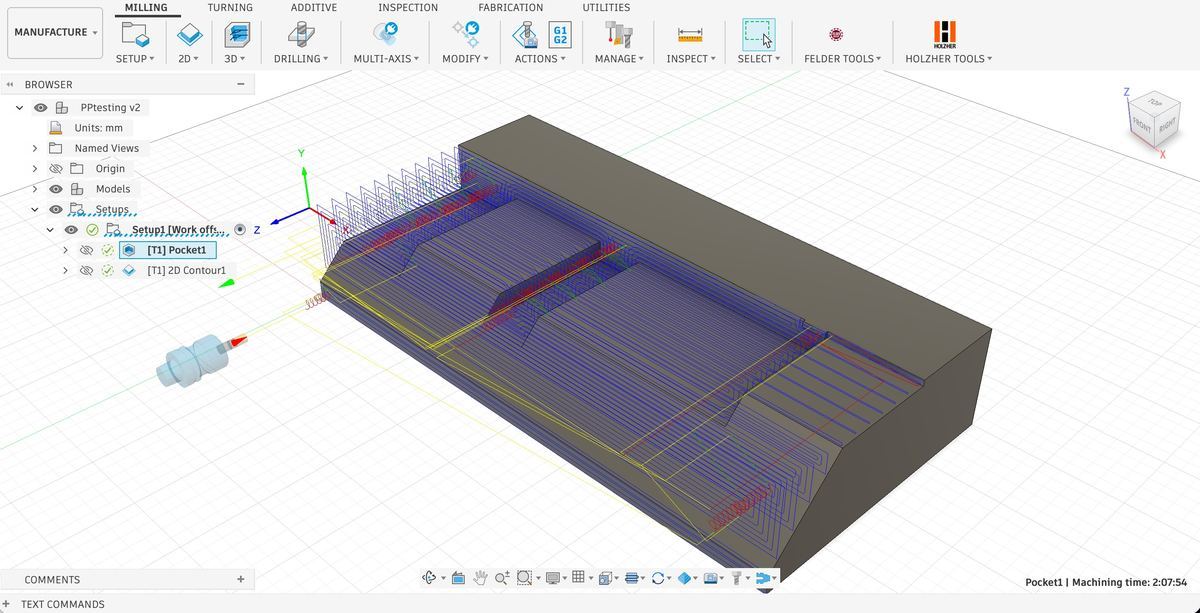
The value is not the file extension alone. It is how Fusion data is translated into a readable, machine-specific SCM workflow.
Structured XCS machining operations remain readable and editable in Maestro instead of becoming a generic NC code stream.
Names from Autodesk Fusion can be transferred into the SCM program, making larger jobs easier to understand and maintain.
Where supported, configurable X, Y and Z correction variables allow minor adjustments in the SCM environment without regenerating every Fusion program.
Compatible installations can include automatic conversion of generated XCS data into the required PGM or PGMX format.
The configured scope can include drilling blocks, saw aggregates, angle heads, indexed 3+2 and simultaneous 5-axis strategies.
The strongest evidence is the combination of public technical work, customer installations and direct access to the person who develops the post.
Pith & Stem moved complex furniture work from manual machine programming into a Fusion-based workflow.
The project connected Autodesk Fusion CAM with an SCM machining centre and created a repeatable path from design changes to machine output.
Read the case study →Mizarstvo Grošelj uses Fusion and SCM Maestro in daily woodworking production.
The postprocessor provides the bridge between CAM preparation and the machine's native environment, with configuration support from CCSOFTCZ.
View the reference →This walkthrough shows how the updated postprocessor generates native operations for SCM Xilog Maestro instead of an anonymous block of standard code.
Pricing stays public so you can qualify the project. The final amount is confirmed only after the technical assessment.
Prices are billed in EUR. The final scope and price depend on the machine, Maestro/Xilog version, kinematics, aggregates and required operations. Taxes, on-site commissioning and work outside the agreed scope are quoted separately where applicable.
Clear boundaries make the first test safer and the quotation more accurate.
No universal post should be assumed to work with every SCM configuration. Compatibility is checked from the exact machine and software information before an offer is confirmed.
The machine model and configuration, Maestro or Xilog version, number and arrangement of axes, installed aggregates, typical operations and one proven machine program if available.
The target is structured XCS output for the agreed Maestro/Xilog workflow. If your machine requires an additional PGM or PGMX conversion step, that workflow is assessed separately.
Yes. Indexed 3+2 and simultaneous 5-axis machining can be supported when included in the quotation and when the real machine kinematics, control configuration and Fusion machine definition are available.
Start with simulation and a simple test part, review the output in Maestro, use safe heights and reduced feeds, and validate each operation on the real machine before production use.
The displayed amounts are starting prices. You receive a clear quotation after the compatibility assessment defines the required functions and test scope.
Yes. Autodesk Fusion is the current name of the product previously known as Fusion 360. The postprocessor is developed for the current Autodesk Fusion CAM environment.
This is a machine-specific integration for customers who require support for their actual SCM configuration, Maestro or Xilog workflow, aggregates, drilling units, machine kinematics and advanced machining requirements.
That depends on the machine and workflow. The postprocessor generates machining data from Autodesk Fusion, while Maestro or the existing SCM environment may still be used for machine-side processing, validation or file conversion.
Where supported by the customer's SCM installation, the workflow can include conversion from XCS into the required PGM or PGMX format.
Support can include drilling units, saw aggregates, angle heads and other SCM-specific equipment, depending on the machine configuration and quoted scope.
Send the minimum technical details. You will receive a direct reply with compatibility questions, the recommended scope and a clear quotation.